
Reference material
Product photographs, multiple views, sketches, CAD references, brand guidance, or a written description.
Send us approved product photos, sketches, dimensions, CAD references, or a written brief. We create a first 3D asset your team can review, test, and refine before committing to full production modelling.
What you receive
Demonstration asset
Demonstration asset. See how product references can move through geometry review, texturing, inspection, and final handoff. This is generated example material, not client work.
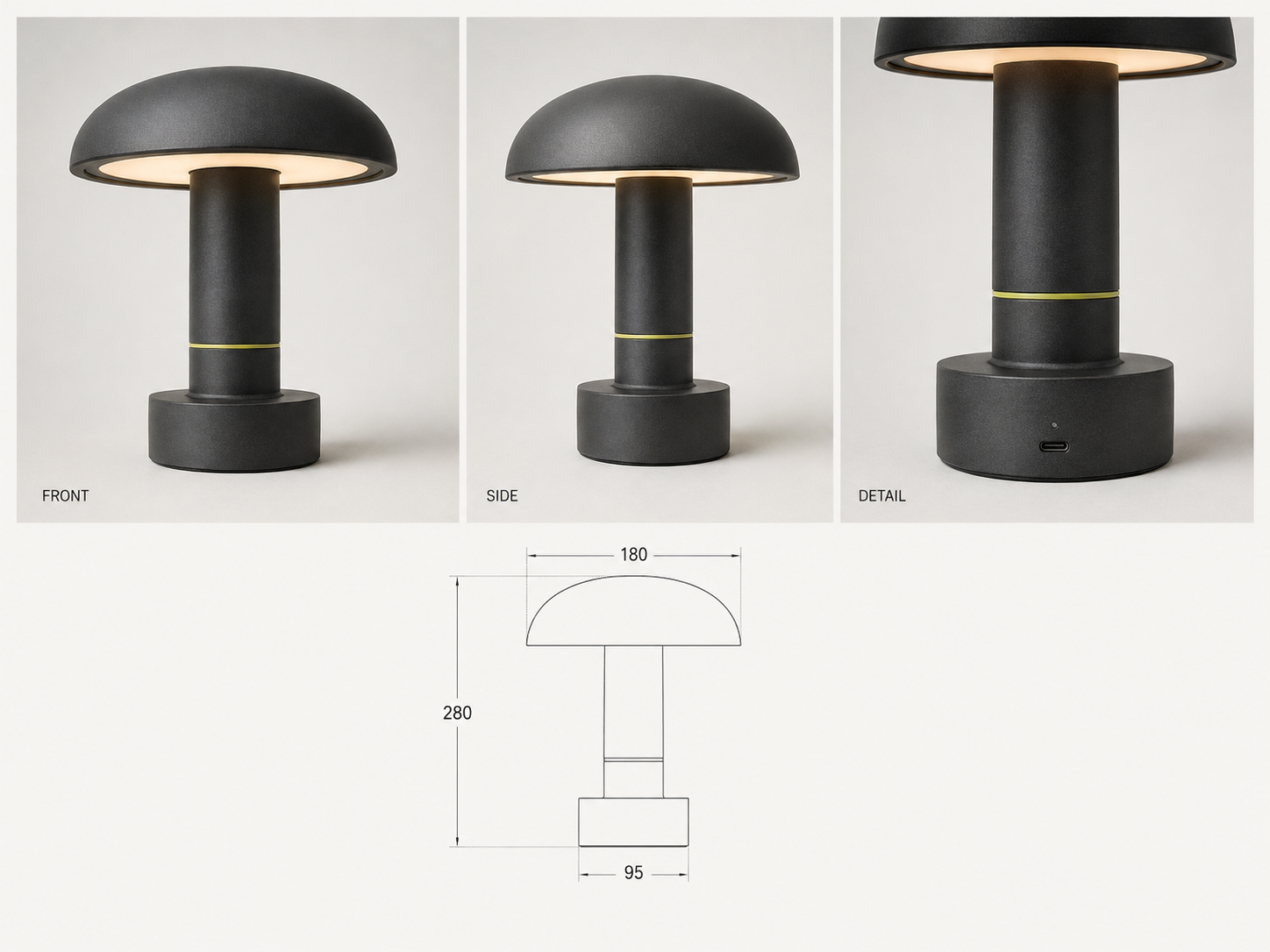
01 · Product reference pack
Approved reference images and dimensions
What we need from you
You do not need to prepare a perfect technical brief. Start with the references you already have and tell us how the finished asset will be used.
Product photographs, multiple views, sketches, CAD references, brand guidance, or a written description.
Ecommerce viewer, configurator, campaign visual, game, animation, AR/VR, product concept, or presentation.
Preferred format, approximate dimensions, scale, polygon budget, texture resolution, compatibility, and deadline.
Confirmation that the references can be used, who approves the result, and where the asset may be distributed.
Common use cases
Start with one representative asset to determine whether the quality, format, and workflow are suitable for your wider project.
Create an asset for an interactive product viewer, configurator, product page, or digital catalogue.
Show a product from different angles before photography, manufacturing, or campaign production begins.
Develop an initial asset for a game, animation, AR/VR experience, virtual environment, or pre-visualization workflow.
Explore shape, proportion, colour, and material directions before investing in detailed production modelling.
Delivery
A model is easier to use when your team knows where it came from, what settings were used, and whether it has been approved.
Model and textures
The agreed mesh and material files, such as GLB or OBJ where configured.
Preview renders
Still renders or a turntable preview so the team can inspect the result without specialist software.
Technical specifications
Format, scale, dimensions, texture resolution, geometry settings, and intended use.
Review notes and limitations
Version, approval state, reviewer notes, known limitations, and recommended next steps.
How it works
The first test helps determine whether the visual quality, file format, texture detail, and workflow are suitable before additional products or variations are requested.
Tell us where the asset will appear, who will use it, and what level of visual or technical quality is required.
Provide approved images, sketches, dimensions, CAD references, descriptions, or existing product guidance.
We prepare an initial version and inspect its silhouette, proportions, geometry, textures, scale, and visible defects against the agreed brief.
After review, we prepare the agreed files, previews, metadata, and handoff notes with a clear approval status.
Commercial expectations
We confirm the exact scope after reviewing your references and intended use. The first test is designed to make quality and suitability visible before a larger request.
One representative product or object.
5 business days for one representative test asset.
2 review rounds included in the test-asset scope.
From $100 for one test asset; additional assets are quoted after the test.
Quality and limitations
Useful for product previews, ecommerce experiments, campaign concepts, early design decisions, and internal reviews.
Check geometry, topology, scale, dimensions, textures, materials, animation compatibility, and file performance before production use.
Manufacturing, construction, safety-critical, or precision-printing use requires the appropriate technical specialist.
A named reviewer decides whether the asset is suitable for publication, release, manufacturing, or further modelling.
Request a test asset
Share your reference material, intended use, preferred format, quality target, approximate volume, and deadline. We will define what can be created, what will be delivered, and what should be checked.