
Browser agents · Reliability
Browser agent settings are an operating policy, not a magic switch.
A practical guide to retries, screenshots, timeouts, OCR, typing delays, wait conditions, click controls, parsing options, and safe stop rules.
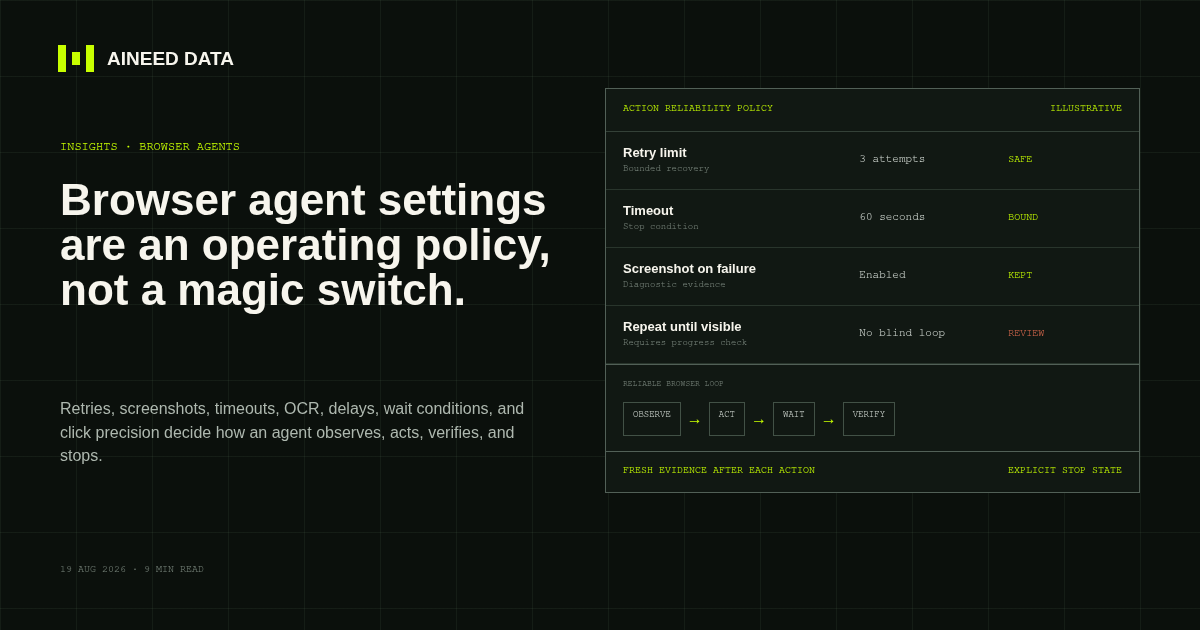
A browser agent does not become dependable because a retry count is high or a timeout is long. These settings collectively decide what the agent can see, what it may do, what evidence it keeps, how it recognizes progress, and when it must stop.
That makes the settings an operating policy. The same click can be low-risk when opening a report and high-risk when submitting a bid, sending a message, placing an order, or confirming a payment. Reliability comes from configuring the action around its consequence.
Core principle
Observe, act, wait, observe again, verify, then stop or recover.
The option labels supplied for this article are treated as a practical browser-action checklist. They should not be read as universal defaults or as a complete description of one vendor’s current interface. Public documentation differs across BrowserAct, Playwright, OpenAI computer tools, and other browser-agent systems.
Control-by-control
What the settings actually decide.
Keep screenshot
Retain visual evidence after a click or failure so an operator can see what the browser saw. Keeping every screenshot increases storage and privacy exposure, so retention should match the purpose.
Retry on action failure
Repeat only when the failure may be temporary and the action is safe to repeat. A failed read can often be retried; a payment, submission, message, or order needs a side-effect check first.
Incognito mode
Starts with a cleaner browser context, but it does not create authorization, anonymity, or exemption from website terms. Authenticated workflows often need approved session persistence instead.
Attach screenshot to prompt
Gives a visual model the current page as evidence. This can help with layout or canvas content, but it also increases data sent to the model and should exclude unnecessary sensitive information.
Use shell
Allows work outside the browser, such as file inspection or conversion. It materially expands capability and security exposure, so it should be disabled unless the workflow has a defined need and constrained environment.
OCR language
Tells optical character recognition what language to expect. OCR is useful when text is not available through the page structure, but critical values still need validation because visual reading can be wrong.
Typing delay
Adds time between keystrokes for interfaces that drop rapid input or depend on keyboard events. It is a compatibility control, not a guarantee that the correct field was focused or the final value was accepted.
Retries
Sets an attempt ceiling. A large number such as 10 can hide a permanent problem, increase cost, trigger duplicate actions, or lock an account. Retries need a reason, a delay policy, progress checks, and a final failure state.
Repeat and timeout
Define how often and how long an action may continue. Every repeat-until rule needs both limits; otherwise a missing element can turn into an endless or expensive loop.
Pre- and post-action delay
Wait before or after an action when a page cannot expose a deterministic ready state. Fixed delays are a fallback: they can waste time on fast pages and still fail on slow ones.
Repeat until visible or invisible
Expresses the state change the action is waiting for. Visibility alone may not prove success; the workflow should also verify the expected business state, URL, value, file, or record.
Scroll direction
Controls discovery outside the current viewport. Scrolling needs stop conditions because feeds can be infinite and repeated content can create duplicates.
Mouse button, double click, click count, and offsets
Control precise pointer behavior. Coordinate offsets are fragile when layout, zoom, viewport, banners, or responsive design changes. Semantic element targeting is safer when available.
Text, objects, delimiter, and quoted strings
Shape extracted output. Parsing controls should preserve source text, define null behavior, and validate the resulting schema instead of assuming every page uses the same formatting.
Overwrite, skip, and take
Decide duplicate and volume behavior. Extremely high limits such as 99,999,999 are not practical safeguards; production runs need an expected range, pagination boundary, cost ceiling, and anomaly alert.
Reliable loop
Retries should refresh evidence, not repeat blindness.
A safe retry takes a new observation and asks whether the page or business state changed. Repeating the same coordinate click against an old screenshot can duplicate actions or interact with a different element after the layout moves.
Observe
Capture a fresh page state and identify the target using stable page structure or current visual evidence.
Act
Perform one bounded action or a small, tightly related group of actions.
Wait
Wait for a deterministic state when possible; use a bounded delay only when the interface provides no better signal.
Observe again
Collect a new screenshot, page state, file state, or record response after the action.
Verify
Confirm the business-visible result, not merely that a click occurred.
Stop or recover
Finish, apply a safe recovery path, or return a structured failure for human review.
A retry limit of 10 is not automatically safer.
Ten repeated submissions can be ten duplicate side effects. The correct limit depends on whether the action is a read, a reversible change, or a consequential commitment.
Buyer checklist
What to ask before trusting a browser agent.
- What proves the intended page state before the action runs?
- What proves the business result after it runs?
- Which failures are safe to retry, and which require human review?
- How are duplicate submissions or writes prevented?
- What screenshots, traces, source URLs, and run records are retained?
- How are credentials, cookies, screenshots, downloads, and prompts protected and deleted?
- What happens when MFA, CAPTCHA, session expiry, or a changed page blocks the workflow?
- What volume, timeout, cost, and pagination limits stop runaway execution?
- Who notices a failed run and who is accountable for restoring service?
The strongest browser-agent deployment is not the one with the most permissive options. It is the one where observation, action, verification, evidence, access, and escalation match the business consequence.
Primary sources
Documentation reviewed.
These sources document specific product capabilities and general reliability practices. They do not endorse Aineed Data or every interpretation in this article.